
Axolotl is a notes app for Mac, iPhone and iPad that keeps your writing in Markdown. The editor styles text as you type and hides the syntax everywhere except the line you’re on, so a note reads like a finished page. Notes live on your devices, and they sync between them with end-to-end encryption, either directly over your local network or through a relay you host yourself.
It has no account and no tracking. It borrows a lot from Bear: nested tags, wiki links, Bear-style search operators and URL actions, and it can import Bear notes. It’s free and open source under the MIT license.


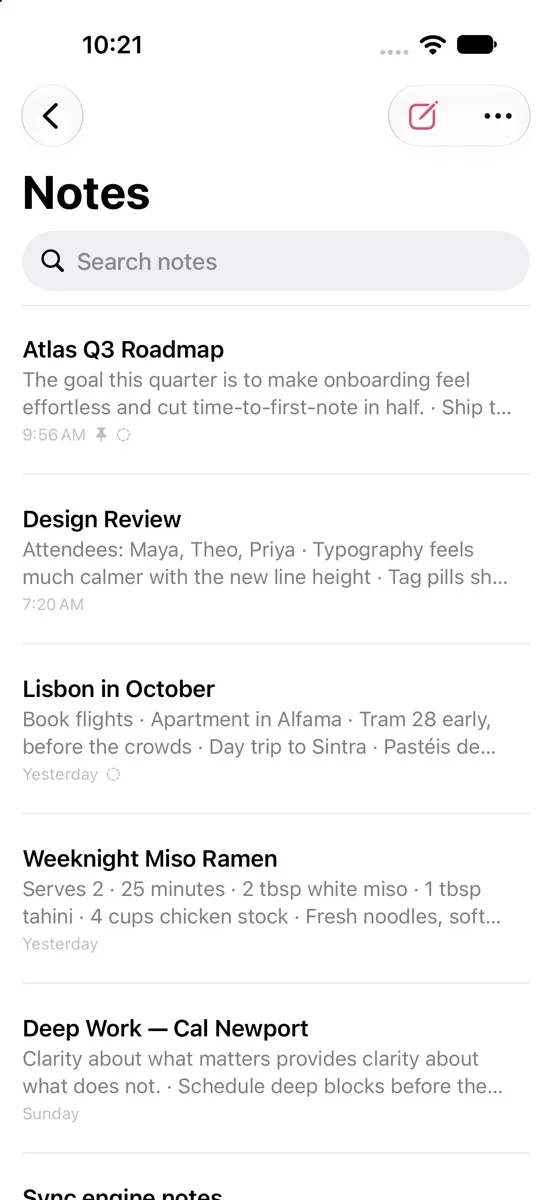
The iPad and editor screenshots follow this site’s theme, in Axolotl’s light theme or Axolotl Night.
Writing
The editor handles headings, bold, italic, strikethrough, ==highlight==, underline, inline code, quotes, callouts like > [!NOTE], tables, footnotes, inline math and fenced code blocks with syntax highlighting. - [ ] becomes a real checkbox, lists continue on their own, and Tab and Shift-Tab indent. Images and files go inline, by drag and drop, paste or the photo picker.
On iPhone and iPad there’s a formatting bar above the keyboard, Apple Pencil sketches and document scanning. Everywhere there’s typewriter mode, adjustable font, size, line height, spacing and line width, find and replace, and version history with restore.
Organizing and search
Tags work as #tags, #nested/tags or #multi word tags#, with icons, pinning and renaming. [[Wiki links]] connect notes, with autocomplete, backlinks and outgoing links. The sidebar has Notes, Todo, Today, Locked, Untagged, Archive and Trash, and Quick Open (⌘O) jumps to any note.
Search takes words, "phrases", -exclusions, tag filters and OR, plus special filters like @todo, @today, @last7days, @date(>2025-01-01), @locked, @images, @backlinks and @ocr. Text inside images is recognized on the device and is searchable too.
Privacy, export and themes
Individual notes can be locked with AES-256-GCM, using a password plus Face ID or Touch ID, and the whole app can be locked as well. A locked note’s title stays visible, as in Bear, and locking it also removes its earlier plaintext history from every device.
Notes export to Markdown, plain text, TextBundle, HTML with embedded images, PDF, RTF, and Word on the Mac, or all at once as a zip of Markdown files. There’s an axolotl:// URL scheme with Bear-style x-callback-url actions. Themes include Axolotl and Axolotl Night, Red Graphite, High Contrast, Solarized, Dracula, Nord, Tokyo Night, Gruvbox, Catppuccin, Everforest and Rosé Pine, with separate choices for light and dark.
How sync works
Axolotl has its own sync engine, in the AxolotlKit Swift package.
- Local-first. Every device has a full SQLite replica and works offline.
- Conflict-free fields. Each field of each note is stamped with a hybrid logical clock, and metadata merges last-writer-wins.
- Merged text. Note bodies carry their revision lineage, and concurrent edits are three-way merged word by word, so edits to different parts of a note both survive. When there’s no shared history to merge from, the other version is kept as a “conflicted copy”, so nothing is lost.
- End-to-end encrypted. Everything comes from a sync code (
AXO-…): the vault id, the server’s auth token and the AES-256-GCM key. Servers and the network only see ciphertext.
There are two ways for changes to travel. Devices with the same sync code find each other over Bonjour and sync directly on the local network, with no server. For devices that are apart, there’s an optional relay you host yourself. It stores only encrypted rows, keeps the latest row per field, and uses long polling, so changes arrive in about a second. You start syncing from Settings → Sync on one device, then enter or scan the code on the others.
The relay is a single Node file with no dependencies, for Node 22.13 or later, or a Docker image. It has settings for closing registration once your vault exists, and limits on vaults, storage per vault and attachment size. Attachments stream to disk, so its memory use doesn’t grow with attachment size.
What the encryption protects
The README is specific about this, including what it doesn’t do:
- Confidentiality. Rows and attachments are sealed with AES-256-GCM under keys derived with HKDF from the sync code. The relay stores only ciphertext, an opaque per-field key (an HMAC of the field’s identity) and a logical timestamp.
- Integrity and rollback. Clients check that the key and timestamp the relay returns match the sealed row, so a relay can’t re-file an old version of a field as the newest. Attachments are addressed by their SHA-256 and verified when they arrive.
- Local network. Peers have to present a frame sealed with the vault key before they can send anything large, and discovery only advertises a short derived hint, not the key.
- Locked notes. Bodies are encrypted with a key derived from your password, using PBKDF2-HMAC-SHA256 with 600,000 rounds for vaults created from 1.2 on.
- Not covered. There’s no forward secrecy: anyone who learns the sync code can read everything synced with it, past and future, so you rotate by creating a new vault. The relay can still see when and how much you sync, and it can withhold data.
Agents and automation
Version 1.3 opened the app to AI agents. On the Mac, Axolotl includes a Model Context Protocol server with 35 tools for searching, reading, writing and editing notes, managing todos and tags, restoring versions, exporting and syncing. It works with Claude Code, Claude Desktop, Cursor and other MCP clients. There’s also a Claude Code plugin with an axolotl-notes skill, an axolotl command line tool for scripts, and App Intents for Siri, Shortcuts and Apple Intelligence on all three platforms.
Agents go through the running app over a Unix socket in your user folder that only apps running as you can reach, and you can turn access off in Settings → Agents, which also logs what agents did. Every agent edit is saved as its own version so it can be undone. Locked notes stay hidden unless you allow agent access and have unlocked them, and destructive tools are marked so clients can ask first.
Try it
Get the latest build from the download page or the releases page.
- Mac:
Axolotl-macOS.dmgor.zip, a universal build for macOS 14 or later. It isn’t notarized, so the first time, right-click the app and choose Open. - iPhone and iPad:
Axolotl-iOS.ipa, an unsigned build for iOS 17 or later, for sideloading with AltStore, SideStore or Sideloadly. AltStore users can add the sourcehttps://nearbycoder.github.io/axolotl/altstore.json.
To build it yourself you need Xcode 16 or later, and XcodeGen if you change project.yml. The README has the build and test commands, the relay’s settings, and the full list of agent tools.
The creation date shown here is the GitHub repository’s UTC creation date. The images on this page come from the project’s website.