
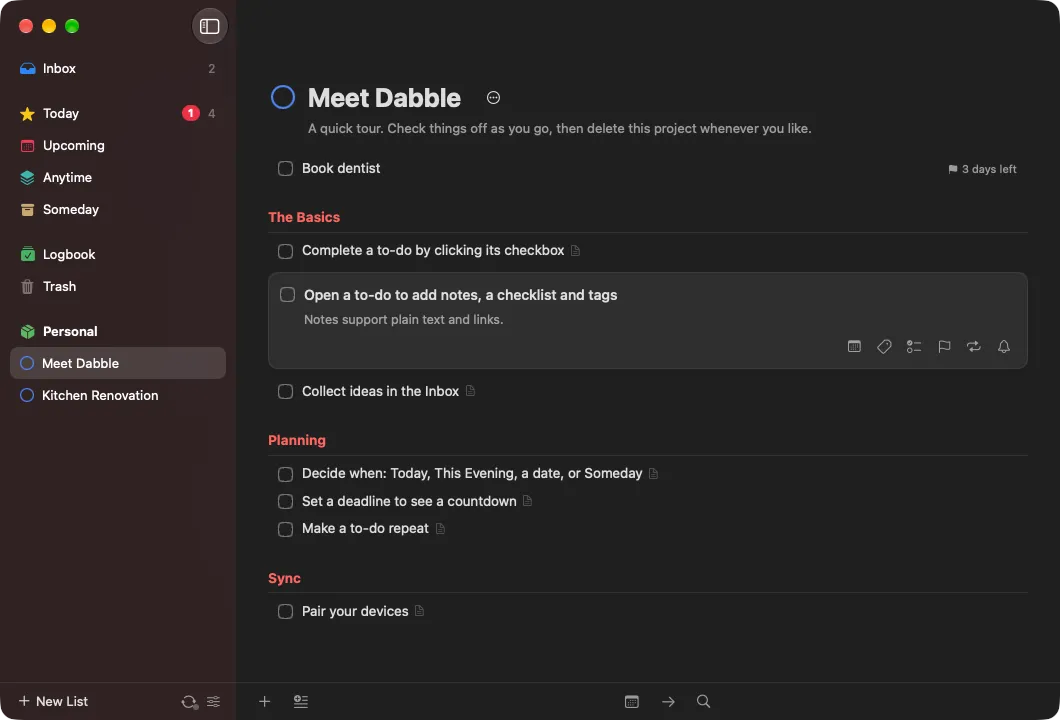
Dabble is a native SwiftUI to-do app for Mac, iPhone and iPad, modeled on Things 3. It has the parts you’d expect: Inbox, Today, Upcoming, Anytime and Someday, projects with headings, areas, tags, checklists, deadlines and repeating to-dos.
The difference is sync. There’s no cloud. Your devices find each other on your network and exchange changes directly over an encrypted channel. Every device holds the full list and works offline. Dabble collects nothing: there’s no Dabble-run server, account, analytics, crash reporting or tracking. It’s free and open source under the MIT license, and it’s an independent project, not affiliated with Cultured Code or Apple.
Features
Organize. An Inbox for anything unsorted. Areas like Work and Home that hold projects and loose to-dos. Projects with headings and a progress pie. Checklists and notes on every to-do. Nested tags that a to-do inherits from its project and area, with a tag filter on every list. A Logbook of completed items and a Trash you can restore from.
Plan. Today, with a separate This Evening section. Upcoming shows the days and weeks ahead, including future repeats. When dates take natural language like today, tonight, fri, next week, in 3 days or Dec 25. Deadlines get a countdown (“2 days left”), reminders are local notifications, and to-dos can repeat on a schedule or a set time after you complete them.
Capture and find. Quick Find jumps to any list, project, tag or to-do. A dabble:/// URL scheme, modeled on Things’ things:///, can add to-dos and projects, show a list, or search. Everything exports to and imports from a JSON backup.
On each device. The Mac has Quick Entry from any app with a global hotkey (⌃Space) and keyboard shortcuts that follow Things’ conventions. iPhone and iPad have a Magic Plus button you can tap to add a to-do or drag to drop one exactly where you want, plus swipe actions to schedule, move or delete. Both have drag and drop, multi-select, undo, and light and dark mode.
How sync works
Each device keeps a complete copy of your data and syncs directly with the other devices in its sync group. The README walks through it in five parts.
Data model. Everything (to-dos, projects, areas, headings, tags, checklist items) is a record made of independently versioned fields. Every field write is stamped with a hybrid logical clock: wall-clock milliseconds, a counter, and the device id. Merging two copies keeps, per field, the value with the greater timestamp, which makes the records a CRDT. Rename a to-do on the Mac and set its deadline on the iPhone while both are offline, and you keep both changes. Repeating to-dos create the next instance with a deterministic id, so if two offline devices complete the same repeat, they make the same next to-do and it merges into one.
Delta sync. Each device numbers its changes with an increasing sequence number and remembers, for each peer, the highest one it has merged. On connect it asks for everything since then, in chunks of 500 records, and while connected new changes are pushed within about 300 ms. Merged changes get a fresh local number, so they relay: if the iPad syncs with the Mac and later the Mac syncs with the iPhone, the iPhone gets the iPad’s edits even though the two never met.
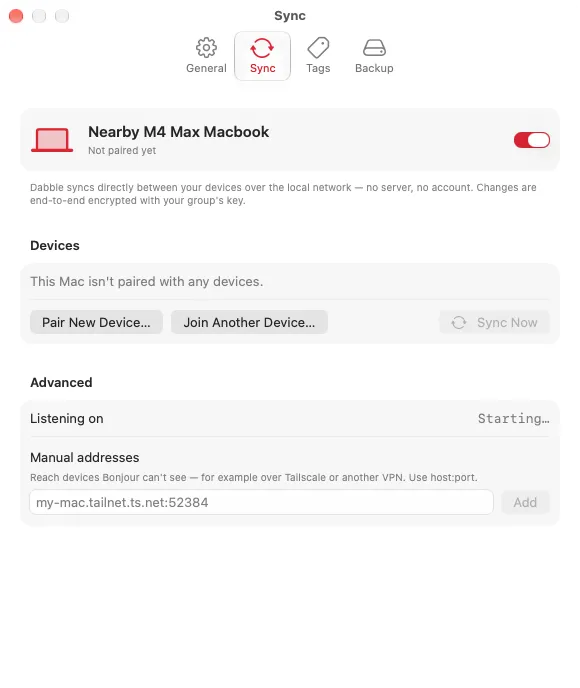
Discovery. Devices advertise a Bonjour service, _dabble._tcp, with a fingerprint of the sync group so they only dial members of their own group. Apple’s peer-to-peer Wi-Fi (AWDL) is enabled too, so a Mac and an iPhone can sync with no router. For networks Bonjour doesn’t reach, such as a Tailscale VPN, you can add manual host:port addresses.
The secure channel. Each connection starts with an ephemeral X25519 key exchange. Two directional keys are derived with HKDF-SHA256 from the shared secret mixed with the 256-bit group key, and every frame after that is ChaCha20-Poly1305 with a counter nonce, so frames can’t be replayed, reordered or dropped without detection. The ephemeral exchange gives forward secrecy, and the group key means only devices in the group can complete a session.
Pairing. One device advertises for five minutes and the new device picks it from a list. They run the same handshake, then a commit and reveal exchange like Bluetooth’s numeric comparison, and both show the same 6-digit code. Only after you confirm the codes match on both devices does the host send the group key. There’s no secret to brute-force, and a man in the middle gets a one-in-a-million chance of producing matching codes. The threat model is in SECURITY.md.
The main limitation is that iOS doesn’t allow background networking for this kind of sync, so the iPhone and iPad catch up when you open Dabble. The Mac syncs whenever it’s running.
An optional sync server
For devices that are apart most of the time, Dabble can also sync through a small relay you host yourself, in server/. It’s the same design as the relay in Axolotl, and nearby sync keeps working alongside it.
It’s one Node file with no dependencies, using node:sqlite on Node 22.13 or later, or a Docker image. Every key it uses is derived from your group key with HKDF, and each field of each record is sealed on the device. The server sees an opaque per-field key, the field’s timestamp and ciphertext, never titles, notes, dates or the group key. It keeps only the newest row per field, so storage tracks your data rather than your edit history. Devices push about a second after a change and long-poll for others, so updates arrive within a second or two.
Agents: MCP, CLI and a skill
Agents can do anything you can do in Dabble. There are three ways in, and all of them share the same set of tools in the core library:
- MCP server.
dabble mcpspeaks the Model Context Protocol over stdio, for Claude Code, Claude Desktop, Cursor, Zed, VS Code and others. - CLI. Commands like
dabble todayanddabble add "Call mom" --when tomorrow, with--jsonfor machine-readable output. - Agent Skill. A
SKILL.mdthat teaches an agent Dabble’s concepts, like when versus deadline, and good habits, like asking before deleting. It also ships as a Claude Code plugin.
There’s still no server. The dabble tool is its own Dabble device: it keeps a replica in ~/.dabble, joins your sync group with your sync key, and syncs like any other device. Nothing reads or writes the app’s files directly, so the app and the agent never fight over a database. If it hasn’t joined your group, it refuses to work and explains how to connect, so an agent can’t quietly fill a separate list nobody sees.
How it’s built
The core is DabbleKit, a Swift package with no UI that holds the CRDT model, the store, the sync engine and the agent tools, along with the dabble CLI and MCP server. The Mac and iOS apps are SwiftUI, generated into an Xcode project with XcodeGen. Encryption uses CryptoKit and networking uses Apple’s Network framework. The relay is plain Node, and the website is plain HTML and CSS on GitHub Pages. Pushing a version tag runs the tests, builds both apps, and publishes a GitHub Release.
Try it
On the Mac, download Dabble-macOS.zip or the .dmg from the latest release and move it to Applications. It needs macOS 15 Sequoia or later. Release builds are ad-hoc signed rather than notarized, so the first launch needs a right-click and Open, or Open Anyway in Privacy & Security.
Dabble isn’t on the App Store. For iPhone and iPad, which need iOS or iPadOS 18 or later, you can build the DabbleiOS scheme with Xcode 26 and a free Apple ID, or sideload the unsigned IPA from the release with AltStore or Sideloadly. The website has the features and an FAQ, and the README covers the URL scheme, keyboard shortcuts, building from source and the roadmap.
The creation date shown here is the GitHub repository’s UTC creation date. The screenshots on this page come from the project’s README.