
node-pirate searches the torrent metadata that The Pirate Bay indexes, from the terminal. Run it with no arguments and you get a full-screen interface with a query field, ranking views, a category filter and a sortable results table. Run it with a command and it prints tables, JSON, CSV or bare IDs for scripts. It only finds things: it shows details and builds magnet links, but it never downloads anything or opens a magnet link by itself. The README asks you to search for and download only content you have the legal right to access.
The repository dates from July 2015, when node-pirate was three small Node.js scripts that scraped the site’s HTML. After a fix in January 2016 it sat untouched for ten years. In July 2026 it was rewritten as version 1.0, and it’s still maintained: 21 pull requests merged in September 2026 added result filters and export formats, and CI was updated in October.
From scraper to API client
The 2015 version had two commands. search took a title, a category (movies, audio, games or app) and a sort order, and asked for any that were missing with Inquirer prompts. It loaded the search page from thepiratebay.se with request, picked the rows apart with Cheerio, and printed them as a table with alternating green and blue rows. download took an ID, scraped the magnet link from the torrent’s page, and downloaded it into ~/Downloads with torrent-stream while drawing a progress bar. Versions 0.1.0 to 0.1.5 went to npm that first week, and 0.2.0 followed in January 2016.

Version 1.0, released on July 26, 2026, is a rewrite. It’s TypeScript running on Bun, with an OpenTUI interface, and it reads API Bay’s JSON endpoints (q.php for searches and t.php for details) instead of scraping pages. Cheerio, request and the prompt library are gone, and so is the downloader: download survives only as an alias that prints the same magnet URI as magnet. Version 1.0.1 followed the same day with security hardening.
The interface
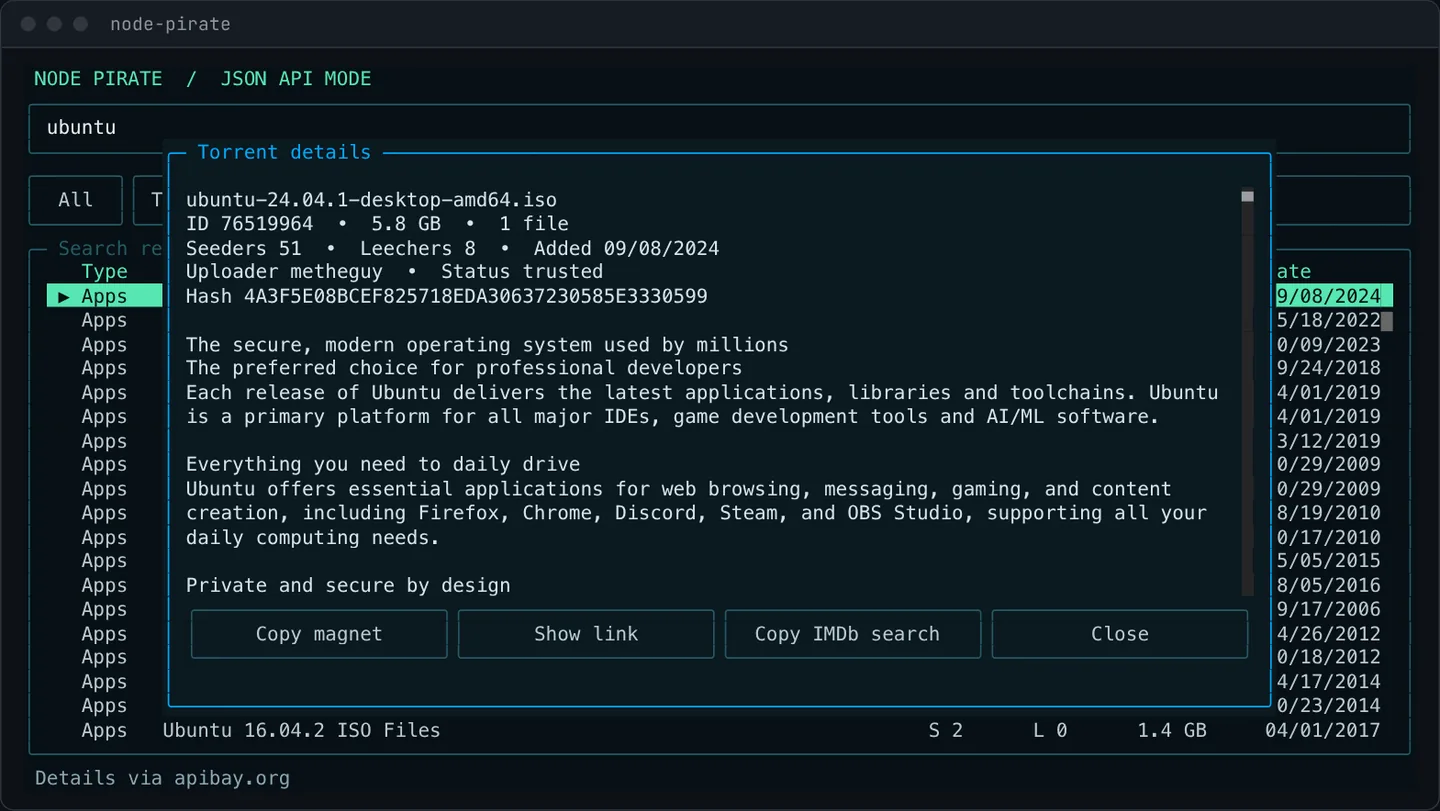
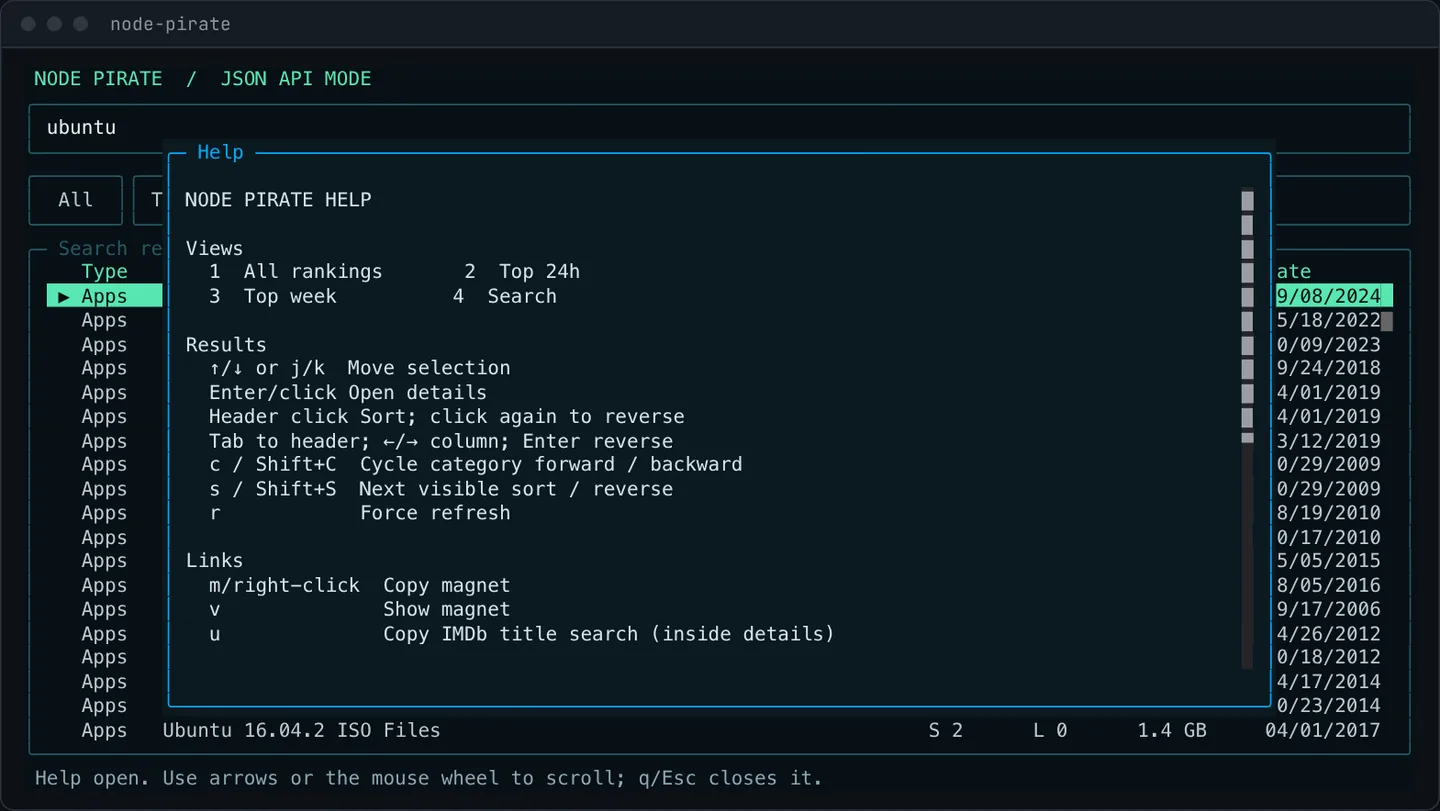
The TUI opens on All, the full category ranking, with Top 24h, Top week and Search beside it. c cycles the category, s cycles the sort column, and clicking a header sorts by it. Enter opens a details modal with the description and Copy magnet, Show link, Copy IMDb search and Close actions. Copying uses OSC 52, and if the terminal can’t do that, Show link prints the magnet in the modal instead. The mouse works for tabs, headers, rows and scrolling, and ? opens the help.
API Bay has a 48-hour ranking but no 24-hour or seven-day feed, so Top 24h and Top week merge the rankings with the recent uploads feed and filter them by date. Feeds load concurrently and stay cached in memory for two minutes, and r forces a refresh.
Command mode
Everything in the TUI has a command: search, top day|week|all, details, magnet and imdb, plus endpoints to health-check the configured servers, categories, config, and completion scripts for Bash, Zsh and Fish. With --json, results and errors both come back as JSON.
The September 2026 work, which is in the source but not yet in an npm release, added filters that search, top and the TUI share: required and excluded title terms, minimum seeders, file counts, size ranges, uploader names, trusted status, and upload age or date range. Results can be paged with --offset, exported as CSV, TSV or JSON Lines, reduced to bare IDs or magnet links, counted, or shown with chosen columns. A filter command applies the same options to saved JSON without any network requests, and --fail-empty and --strict give scripts their own exit codes for empty or partial results.

Endpoints and hardening
The default endpoint is https://apibay.org/. You can add any number of API Bay-compatible mirrors with --endpoint, an environment variable or a config file, and they’re tried in order. The first one that answers becomes the preferred endpoint for the rest of the process. Timeouts, error statuses, HTML pages and invalid JSON all count as failures and move on to the next mirror.

Everything node-pirate shows comes from a remote index, so 1.0.1 treats that data carefully:
- Torrent IDs must be short runs of ASCII digits before they reach the screen or another request.
- Text is length-bounded, normalized, and stripped of ANSI, OSC, C0/C1 and bidirectional formatting controls.
- Responses are streamed with a 4 MiB limit, and result lists over 5,000 entries are rejected.
- Redirects are limited to three hops and must stay on the endpoint’s origin.
- Credentials in an endpoint URL are sent as Basic authorization, redacted from all output, and only allowed over HTTPS, except on loopback.
How it’s built
It’s TypeScript on Bun 1.2 or newer, which OpenTUI’s native renderer needs, with @opentui/core 0.4.5 for the interface and Commander 15 for the commands. Like hackernews-tui, the interface is built on OpenTUI. bun build compiles the CLI into one file, dist/node-pirate.js, which is all the npm package ships besides the README and package.json. The tests run with bun test, and the TUI tests render on OpenTUI’s memory renderer, so they check the real layout without touching a terminal.
GitHub Actions runs on pull requests, pushes and a weekly schedule. It verifies the locked dependency tree, npm advisories and registry signatures, the tests and the build, and fails if the package would contain anything else. A separate workflow publishes to npm from a GitHub release through trusted publishing with provenance, so no long-lived npm token is involved.
Try it
You need Bun 1.2 or newer. The npm package is at 1.0.1, which predates the filter and export work, so the README’s from-source steps get you everything on this page:
git clone https://github.com/nearbycoder/node-pirate.git
cd node-pirate
npm install
npm run build
npm link
node-pirate tui ubuntu
The creation date shown here is the GitHub repository’s UTC creation date. The terminal screenshots were captured by running the current source locally against apibay.org with searches for Ubuntu images, and the code cards show real source files from the repository, including the 2016 version from its git history.