
Scrub is a Mac cleaner and optimizer, built natively for macOS Tahoe. It cleans caches and junk, uninstalls apps along with everything they leave behind, maps where your disk space went, runs maintenance tasks, and shows what your Mac is doing right now.
It’s free and open source under the MIT license. It was inspired by Mole and the commercial Mac cleaners, and it’s an independent implementation written from scratch. Releases are signed with a Developer ID and notarized by Apple.
What it does
| Feature | What it does |
|---|---|
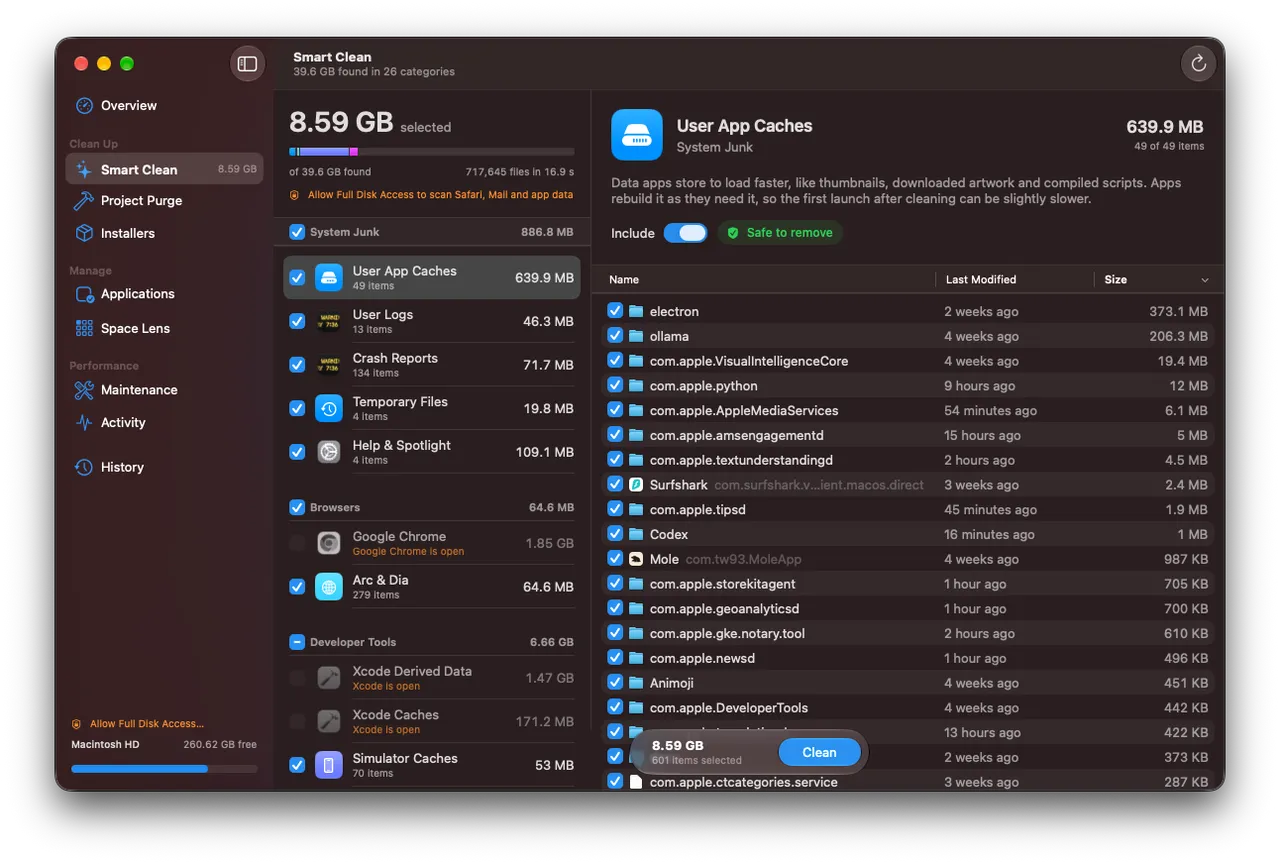
| Smart Clean | System and user caches, logs, crash reports, temporary files, browser caches, developer junk like Xcode DerivedData and package-manager caches, chat and AI app caches, old installers, leftovers from deleted apps, and the Trash. Every file is listed first. |
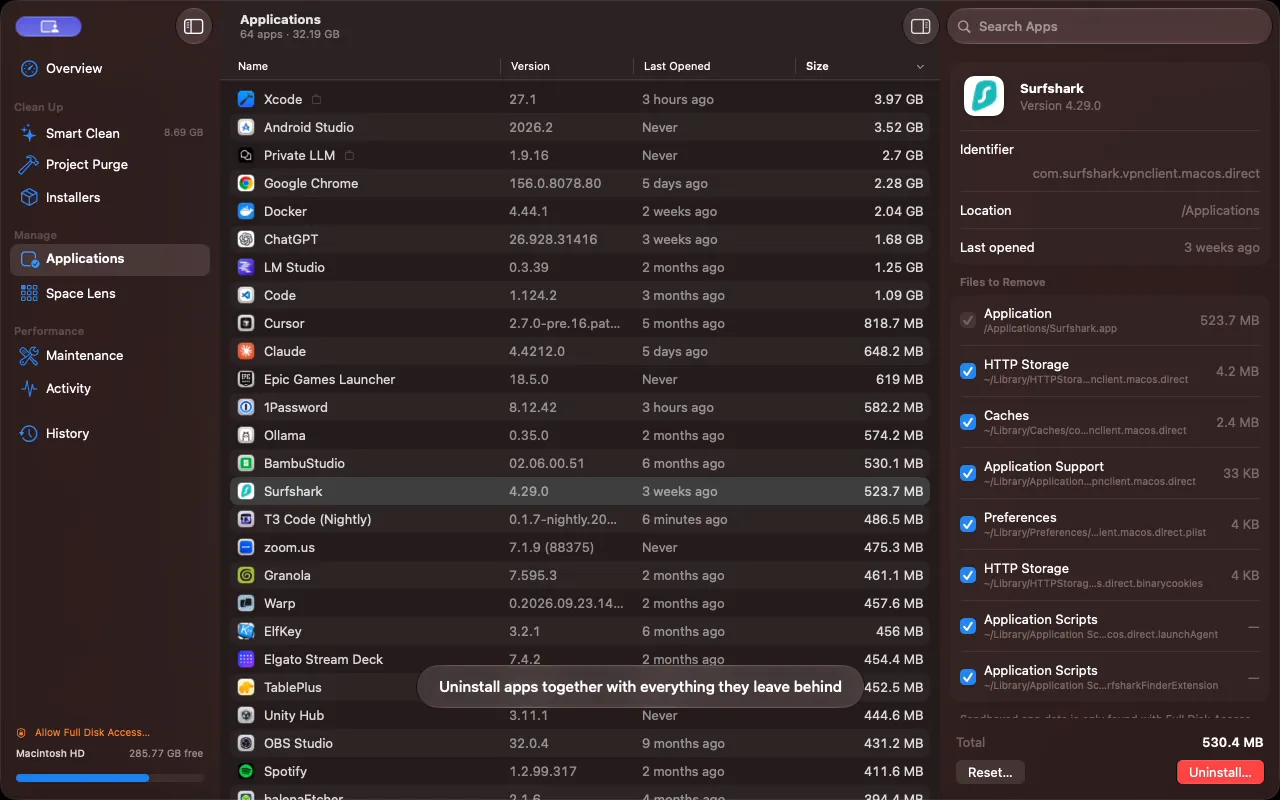
| Applications | A sortable table of your apps. The inspector lists everything an app leaves behind, and you can uninstall it or just reset its data. Everything goes to the Trash. |
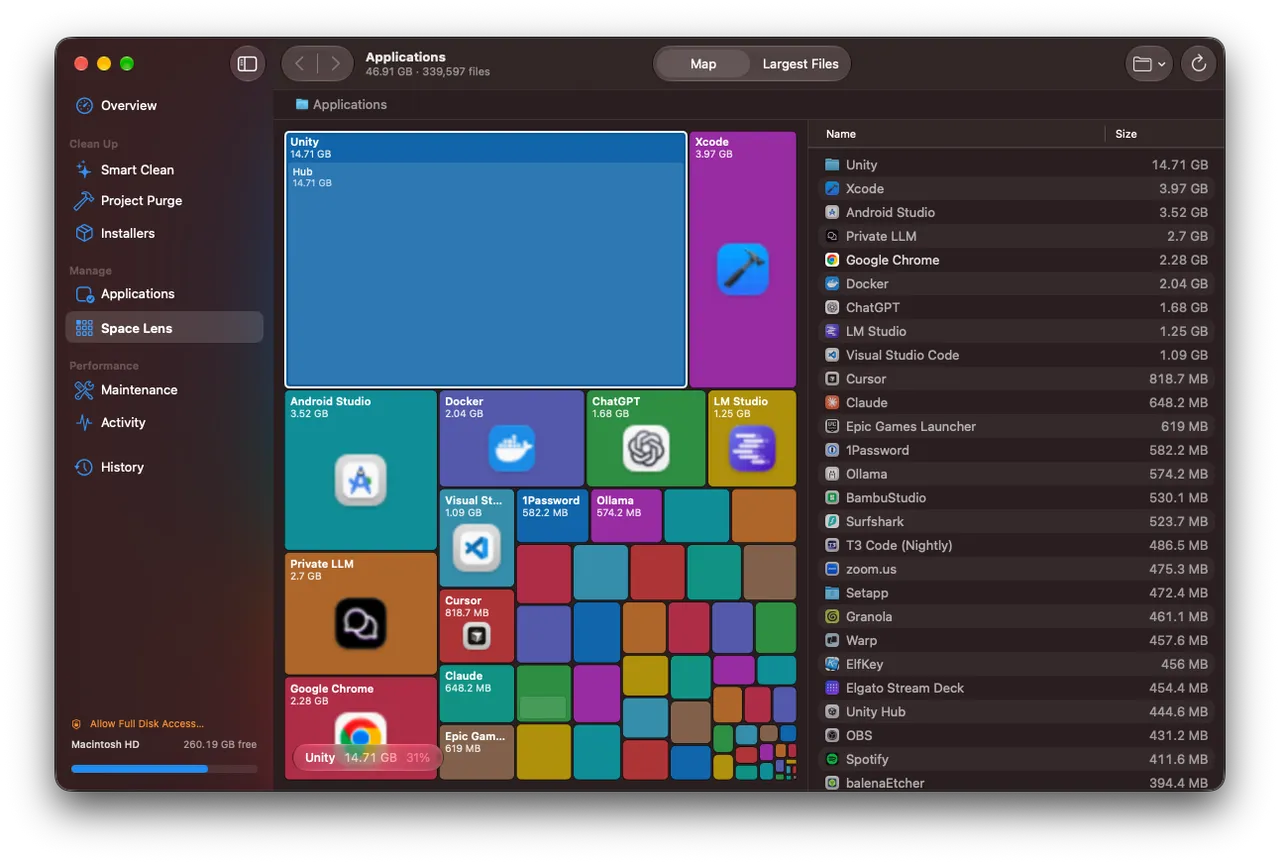
| Space Lens | A treemap of any folder or drive, with back and forward navigation, a path bar, and a largest-files table. |
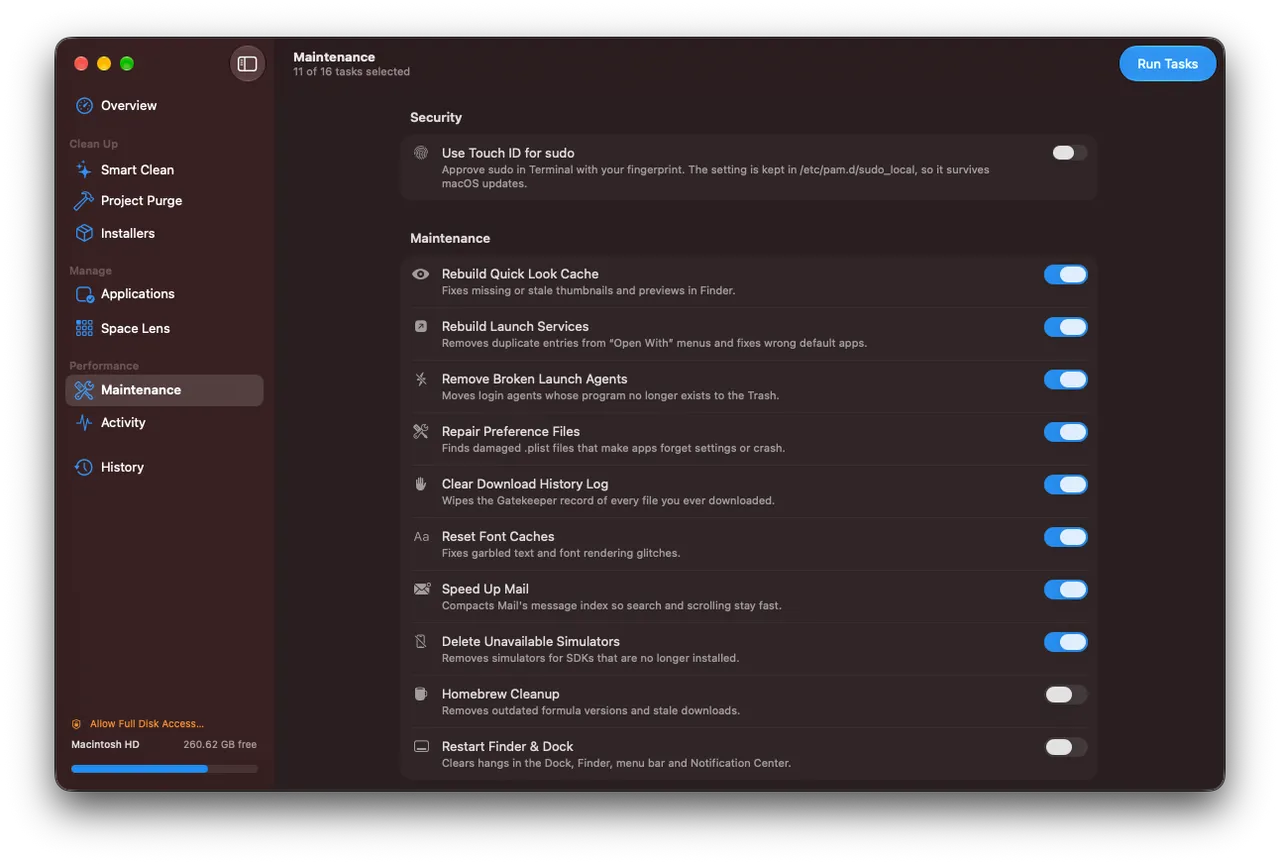
| Maintenance | Rebuilds the Quick Look and Launch Services caches, repairs damaged preference files, resets font caches, compacts Mail’s index, flushes DNS, reindexes Spotlight and more. Admin tasks share one password prompt. |
| Touch ID for sudo | One switch writes /etc/pam.d/sudo_local, which survives macOS updates. |
| Activity | CPU per core, memory and pressure, swap, disk I/O, network, GPU, battery health and a process table you can quit processes from. |
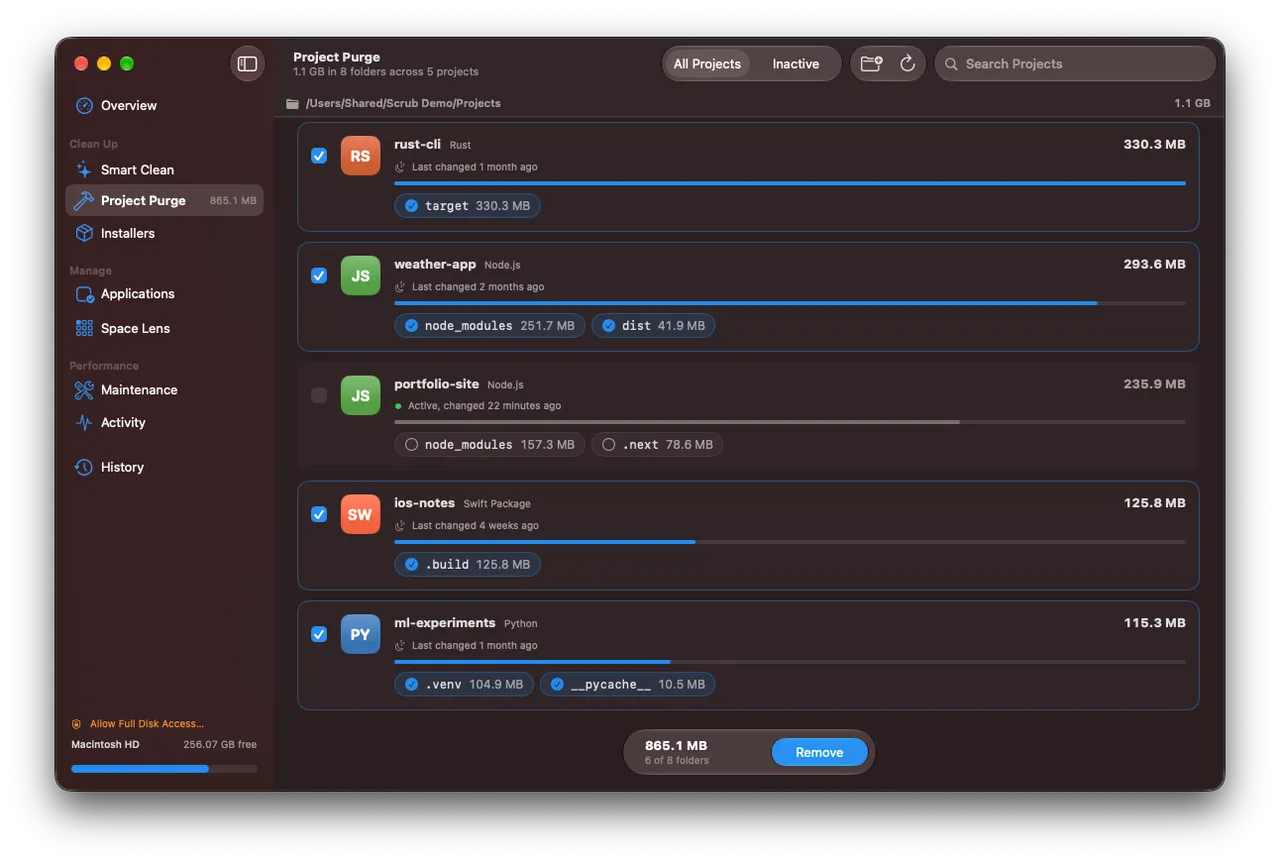
| Project Purge | Finds node_modules, target, .build, dist, .next, __pycache__, venv, Pods and other build folders across your projects. |
| Installers | Finds .dmg, .pkg, .iso, .xip and installer .zip files in Downloads, Desktop, Documents, iCloud Drive, Mail and the Homebrew cache. |
| Menu bar | Live meters, Smart Scan and Free Up Memory. |
| History | A log of every cleanup: what was removed, from where, and how much space it freed. |
Smart Clean covers Safari, Chrome, Edge, Brave, Arc, Firefox, Opera and Vivaldi, and developer caches from Homebrew, npm, Yarn, pnpm, Bun, pip, uv, CocoaPods, Gradle, Cargo and Go. Each category shows its app’s icon, a plain-language explanation, a safety rating and a sortable list of every file. Project Purge shows each project as a card with its stack, when it last changed, and a toggle for each build folder.
Built to be cautious
A cleaner is only useful if you can trust it, so most of the design is about not removing the wrong thing.
- Preview first. Nothing is removed until you review it and press the button.
- A path guard. It refuses
/System,/usr,/bin,/Library,/Applications, your home folder, and top-level folders like Documents, Desktop, Downloads and~/Library. Symlinked parent folders are resolved before the check, walks never follow symlinks, and links that lead off the startup disk are skipped. - Running apps are skipped. Caches of open apps, and browser caches while the browser is open, are left alone.
- Protected items. Right-click anything and choose Always Protect This Item.
- The Trash when it matters. Apps, leftovers, installers, backups and anything from Space Lens go to the Trash. Regenerable caches are deleted directly by default, and Settings can send them to the Trash instead.
- Conservative defaults. Package-manager caches, Xcode archives, device backups and leftovers of removed apps start unselected. Leftovers only show up when no installed app from the same vendor exists and nothing has written to them in 15 days. In Project Purge, folders git tracks are protected and recently active projects start unselected.
Without Full Disk Access, Scrub skips the locations where macOS would show a privacy prompt rather than interrupting you. Granting it lets Scrub include Safari, Mail and sandboxed app caches.
Fast, and quiet when idle
The disk walker reads directories with getattrlistbulk(2), which returns names, types, sizes and dates for a whole batch of entries in one system call, spread over a pool of threads. Mapping a 240 GB ~/Library with about 900,000 files takes about 12 seconds in the README’s measurement, against 35 seconds for an fts walk and 46 for du. Smart Clean lists every rule’s candidates first and measures them together in a single parallel walk.
The treemap is drawn in one SwiftUI Canvas, with layout computed once per folder and size, so hovering only redraws a highlight. Live sampling runs only while Overview, Activity or the menu bar panel is open, and process stats come from libproc instead of spawning ps. With no window showing live data, Scrub sits at 0% CPU.
Native by design
Scrub sticks to standard macOS building blocks: a source-list sidebar, unified toolbars, sortable Table outlines, inspectors and grouped forms. Liquid Glass appears only where macOS itself uses it, on the control layer: the toolbar, the sidebar, and floating controls like the action bar. Content stays plain and readable. The app icon is made with Icon Composer.
Cleanup rules live in one catalog file, CleanCatalog.swift, so adding support for another app is usually a few lines. The release script archives the app, signs it with a Developer ID, notarizes and staples both the app and the disk image, and builds the drag-to-install DMG with dmgbuild.
Try it
Download Scrub.dmg and drag Scrub to Applications, or install it with one line:
curl -fsSL https://raw.githubusercontent.com/nearbycoder/scrub/main/install.sh | bashIt needs macOS 26 Tahoe or later and runs natively on Apple silicon and Intel. Once installed, Scrub checks GitHub for new releases once a day and installs them in place, but only if the update is notarized by Apple and signed by the same developer. The website has the demo and screenshots, the releases page has the changelog, and the README covers building from source with Xcode 26.
The creation date shown here is the GitHub repository’s UTC creation date. The screenshots and video on this page come from the project’s README and website.